
Exchange Guides
How to Transfer USDT from OKX to a Wallet: Network, Fees & Test Transfer (2026)
Learn how to send USDT from OKX to a wallet safely: match the network, check the address, handle tags, review fees, and test with a small amount.
Disclosure: This is an educational guide, not financial advice. Crypto transfers are usually irreversible. OKX screens, supported networks, fees, minimums and verification requirements can vary by region and change over time.
The most important rule when transferring USDT from OKX to a wallet is to match the asset and network on both sides. USDT on one network is not automatically the same as USDT on another. A wrong network, address or required tag can delay recovery or make funds difficult to recover.
Before you start
You need a verified OKX account that can make withdrawals in your region, the receiving wallet address, the exact network supported by that wallet, any memo, tag or payment ID the destination requires, and enough USDT for the transfer plus the displayed fee.
Do not copy an address from an unsolicited message. Open the receiving wallet yourself and use its current deposit screen.
Step 1: Open the receiving wallet first
In the receiving wallet or exchange, choose USDT and open Deposit or Receive. Record the wallet address, network name, any memo, tag or payment ID, and the minimum deposit if shown.
The receiving side is the source of truth for what it accepts. If it supports USDT on TRON, Ethereum or another network, select the same network in OKX. Do not choose a network only because its fee looks lower.
Step 2: Open Withdraw in OKX
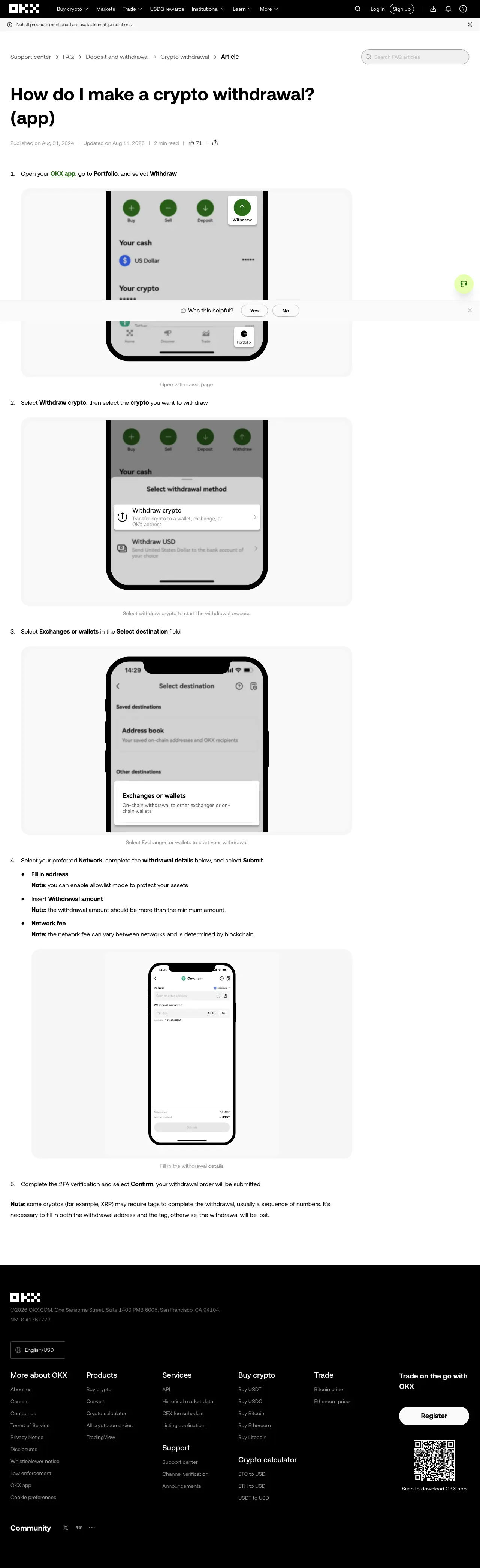
In the OKX app, open Assets or Portfolio and choose Withdraw. Select crypto withdrawal, then choose USDT. The exact menu label may differ by app version.
If you see both an internal transfer and an on-chain withdrawal, choose the on-chain route for an external wallet.
Step 3: Choose the matching network
Select the wallet or exchange destination and paste the receiving address. Then choose the exact network shown by the receiving wallet.
Check all three together:
- The asset is USDT.
- The network is identical on both sides.
- The address belongs to the intended wallet.
Compare the first and last characters, and use an address allowlist when available.
Step 4: Handle a tag or memo
Some assets and receiving services require an extra identifier such as a memo, tag or payment ID. USDT transfers do not always use one, but the receiving platform’s deposit instructions decide.
If the receiving screen displays a required tag or memo, enter it exactly. If it does not show one, do not invent one.
Step 5: Review amount, minimum and fee
Review the amount leaving OKX, the amount expected at the destination, the network fee, the minimum withdrawal amount, and any warning about address or network compatibility. The live withdrawal screen is more reliable than a general fee estimate from an old article.
Step 6: Send a small test transfer
For a new wallet or unfamiliar network, send a small amount first. Wait for the receiving wallet to show the deposit before sending the remainder. A test transfer does not remove all risk, but it limits the amount exposed to a mistake.
Step 7: Complete verification and track the TxID
Confirm the withdrawal with the required security checks. Save the order ID or transaction ID (TxID). Use a blockchain explorer or the receiving platform’s deposit history to check progress.
A completed withdrawal in OKX means the asset has left OKX; it does not necessarily mean the receiving platform has credited it. If the transfer is complete on-chain but missing from the destination, contact the receiving wallet or exchange with the TxID.
Common mistakes
Choosing the cheapest-looking network. The network must match the receiving side.
Sending USDT to a BTC address. The asset and address format must be supported by the destination.
Skipping the test transfer. A test is especially useful for a new wallet, new exchange or large amount.
Using an old saved address. Reopen the destination’s deposit page before sending.
Ignoring minimums. A transfer below the receiving platform’s minimum may not be credited automatically.
FAQ
Which USDT network should I use? Use a network the receiving wallet explicitly supports for USDT and select the identical network in OKX.
Do USDT transfers always need a memo or tag? No. Follow the receiving platform’s current deposit instructions.
Can I cancel a USDT withdrawal? Do not assume so. Once broadcast or completed, blockchain transfers are generally difficult or impossible to reverse.
Why has the receiving wallet not credited my USDT? Check the network, address, tag, confirmations, minimum deposit and TxID. If the transaction is complete on-chain, contact the receiving service.
Educational content only. Not financial advice. Verify the live OKX withdrawal screen and receiving wallet instructions. Last reviewed: August 2026.