
Exchange Guides
How to Withdraw from OKX (Crypto & Fiat): Step-by-Step
Withdraw crypto to a wallet or cash out via P2P — safely, step by step.
Disclosure: This guide contains a referral link to OKX. If you register through it, ucneo may earn a commission at no extra cost to you, and you may qualify for trading-fee rebates. Educational content only — not financial advice. Crypto trading carries risk, including the possible loss of your capital.
Getting your money out should be as easy as putting it in. This guide shows how to withdraw crypto to an external wallet or another exchange, and how fiat/P2P withdrawal works — safely.
Before you withdraw
- Your account must be KYC-verified and, ideally, protected with 2FA and a withdrawal address allowlist.
- Know the destination: an exchange deposit address, or a wallet you control.
- Match the network exactly — this is where most losses happen.
Withdraw crypto, step by step
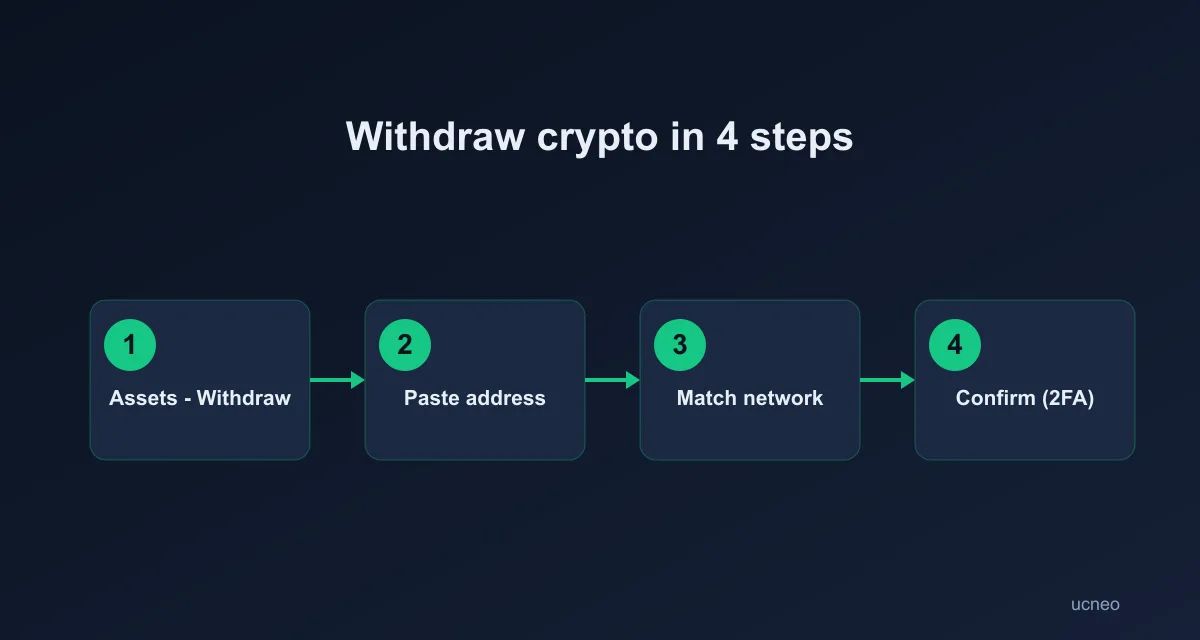
- Go to Assets → Withdraw and choose the coin (e.g. USDT).
- Select on-chain withdrawal and paste the destination address. Double-check it — malware can swap clipboard addresses.
- Choose the correct network (the one your destination expects). Sending on the wrong network can cause permanent loss.
- Enter the amount. Note the network withdrawal fee shown.
- Confirm with 2FA. For large amounts, send a small test first.
Withdraw to fiat (cash out)
Depending on your country you can cash out via P2P (sell USDT for local currency) or supported fiat channels. On P2P:
- Sell to a high-rating buyer with many completed orders.
- Only release your crypto after the money has actually arrived in your account.
- Keep all communication inside OKX; never trade off-platform.
Common withdrawal problems
| Symptom | Likely cause |
|---|---|
| Funds not arriving | Wrong network chosen |
| Withdrawal blocked | New device / security hold — wait out the review window |
| Address rejected | Allowlist not set / typo in address |
Safety checklist
- 2FA on, allowlist on
- Network matches destination
- Test amount for large sends
- Never share 2FA codes; support will never ask.
New to fees? See OKX fees explained. Don't have an account yet? Register on OKX.
Why withdrawals get held (security holds)
Logging in from a new device, changing your password, or resetting 2FA typically triggers a temporary withdrawal hold (often ~24 hours). It's a protection feature, not a malfunction — and no legitimate party can "expedite" it for a fee; anyone offering to is a scammer.
Choosing the withdrawal network (and saving on fees)
Withdrawal fees differ per coin per network — for the same USDT, a cheaper network can cost a fraction of an expensive one. Rules: the network must match the destination; batch withdrawals (one larger instead of five small) to amortize flat fees; and always test a new address with a small amount first. Current fee levels: see OKX fees explained.
Selling to fiat via P2P: the golden rule
When cashing out through P2P, your crypto sits in escrow while the buyer pays you. Check your own bank/e-wallet balance — not a payment screenshot — before releasing. Screenshots are trivially faked; your account balance isn't. Keep all chat in-platform so disputes can be resolved with evidence.
Make the test transfer a reflex
For any new destination — a wallet you just created, an exchange you have not used, a friend's address — send a small amount first and wait for it to arrive before sending the rest.
This feels like a waste of a network fee. It is insurance priced at one network fee. Crypto transfers are effectively irreversible, and the failure modes that a test transfer catches are the expensive ones: wrong network, wrong address, a missing memo, or a destination that quietly does not support the asset you sent. The cost of skipping the test is not the fee you saved; it is the entire amount.
Make it automatic for new destinations and large amounts. For an address you have used successfully many times, the risk is lower — but reopen the destination's deposit page anyway rather than reusing a saved address, because addresses do get rotated.
What "completed" actually means
A withdrawal marked completed in OKX means the asset has left OKX and the transaction was broadcast. It does not mean the receiving platform has credited it.
Those are two separate events with two separate owners. If the blockchain explorer shows the transaction confirmed but your balance at the destination has not moved, the problem is on the receiving side, and OKX cannot fix it. Take the transaction ID and contact the receiving wallet or exchange with it.
Understanding this split saves a lot of wasted anxiety, and it tells you who to talk to. Our guide to withdrawals that appear stuck works through the usual causes in order.
Withdrawing to another exchange vs to your own wallet
These look like the same action and carry different risks.
To another exchange: the destination controls the address, and it may require a memo or tag, may not support the network you chose, and may have a minimum deposit below which nothing gets credited automatically. Always open the destination's deposit screen and copy from there.
To your own wallet: you control the address, and you also become responsible for the recovery phrase. There is no support desk if you lose it. That trade-off is the whole point of self-custody — you remove the platform risk and take on key-management risk instead.
For long-term holdings, most of the argument favours self-custody, because the risk you are removing is exactly the one no review can quantify. For funds you intend to trade next week, leaving them on the platform and paying no network fees is usually more sensible. Decide by intended holding period, not by mood.
FAQ
How long do withdrawals take? Usually minutes once confirmed on-chain; occasionally longer during security reviews. Why is there a withdrawal fee? It covers the blockchain network cost; it varies by coin and network. Can I cancel a withdrawal? Only before it is broadcast on-chain; after that it is irreversible.
Educational content only. Not financial advice. Last updated: July 2026.
A worked withdrawal check
Suppose the destination shows a USDT deposit address on one specific network. Before pasting anything into OKX, write down three matching fields: asset = USDT, destination network = the network named by the receiver, destination address = the full address. In OKX, all three must match. A familiar-looking address is not enough; the network label is part of the destination.
For a new route, use a two-transfer process: send the smallest practical test amount, wait until the receiving platform credits it, and only then send the balance. Record the transaction ID and the amount received after fees. This turns an irreversible action into a verifiable checklist and gives you a real cost figure for future withdrawals.